A semi-transparent desktop widget for Home Assistant that provides quick access to your smart home devices from your desktop.


Settings: Personalization
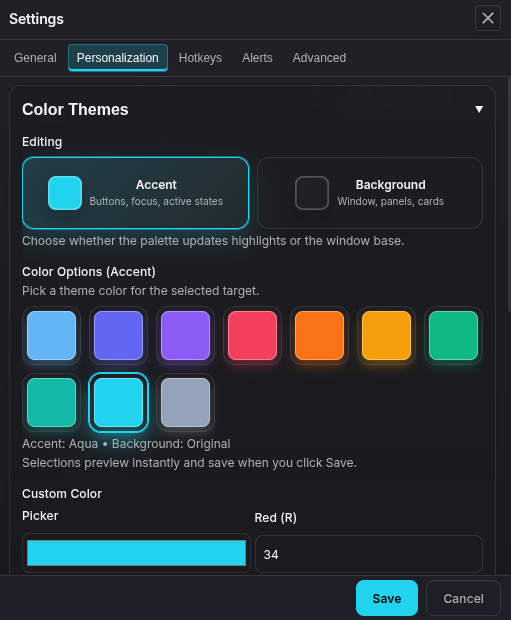
The Settings modal is organized into General, Personalization, Hotkeys, Alerts, and Advanced. Personalization covers color themes, window effects, weather animations, primary cards, custom entity icons, and media tile selection. General includes Home Assistant connection, window behavior, language packs, profile sync, and update checks.
In Personalization → Window Effects, choose Text and control size (100%, 115%, 130%, or 150%) to enlarge the interface, dialogs, and desktop pins. Enable High contrast with opaque panels for a dark, solid background and brighter text and borders. These preferences save immediately. Small pins can scroll when their enlarged controls need more space.
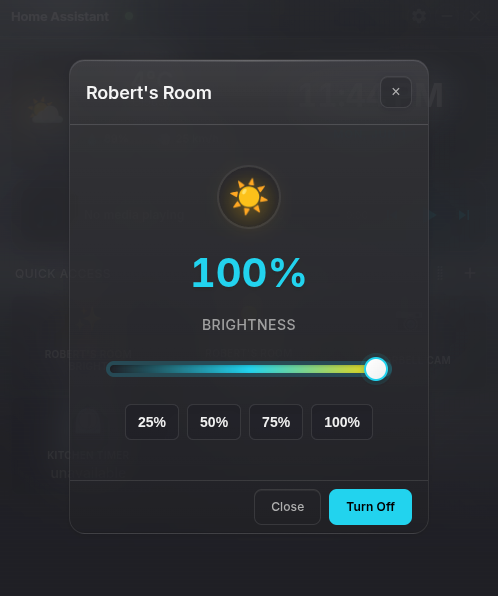
Light, climate, fan, cover, and media tiles include a visible Controls button to open their detailed controls. Keyboard users can also focus a tile and press Shift+Enter.
Omarchy and Arch Linux
See the Omarchy guide for native desktop layers, independent desktop pins, Hyprland shortcut setup, live theme following, and Arch packaging. Build a local pacman package with npm run dist:arch followed by makepkg --nodeps in dist/arch.
Weather Effects

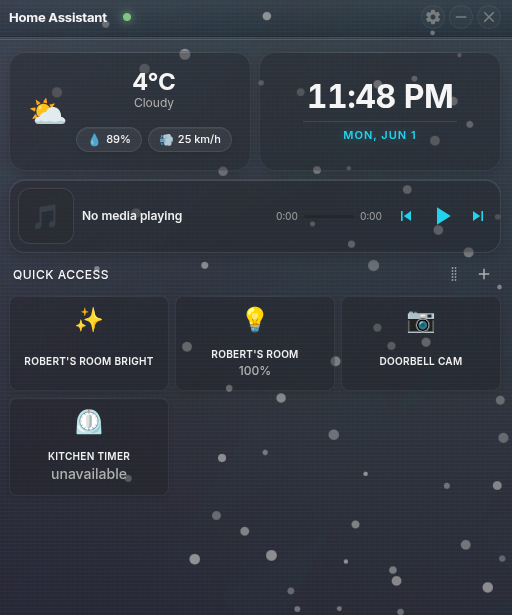
Features
Smart Home Control
- Real-time Updates: WebSocket connection for instant entity state changes
- Quick Access Dashboard: Customizable grid of your most-used entities
- Entity Management: Add, remove, rename, and reorder entities with drag-and-drop
- Desktop Pins: Pin selected Quick Access entities as movable, resizable desktop tiles
- Custom Names & Icons: Rename entities and override entity icons without changing Home Assistant
- Tile Options: Adjust selected Quick Access readout sizing for dense or prominent tiles
- Camera Tile Previews: Opt into a visibility-scoped authenticated HLS stream or snapshots, then click the tile to grow that same feed into a larger view and reconnect a stale camera session when needed
- Interactive Controls: Toggle lights, switches, scenes, and more with a single click
Modern Interface
- Rainmeter-style Design: Clean, transparent desktop widget aesthetic
- Responsive Layout: Auto-sizing tiles that adapt to content
- Dark/Light Themes: Automatic theme switching based on system preferences
- Color Personalization: Built-in and custom accent/background colors with live preview
- Weather Effects: Optional subtle rain, snow, clouds, sun, and storm animations when frosted glass is enabled
- Smooth Animations: Fluid drag-and-drop and hover effects
- Toast Notifications: Real-time feedback for all actions
Entity Support
- Lights: Toggle on/off, brightness control, and desktop-pin brightness presets
- Switches, Fans & Input Booleans: Simple on/off controls, with fan speed controls where available
- Covers & Locks: Open/close and lock/unlock controls
- Sensors & Binary Sensors: Real-time value display with units and state-aware icons
- Timers: Live countdown displays for active timers
- Cameras: Optional Quick Access snapshots plus live feed viewing with snapshot fallback
- Climate: Temperature display and control
- Media Players: Play/pause, previous/next, artwork, seek bar, and 10-second rewind/fast-forward where supported
- Scenes, Scripts & Buttons: One-click scene activation, script running, and button/input-button pressing
- Automations: Trigger, toggle, enable, or disable from configured hotkeys
Advanced Features
- Updates: Automatic installation for Windows installer and Linux AppImage builds; portable, macOS, and Linux deb builds use a GitHub Releases download flow
- System Tray: Minimize to tray with quick access menu
- Tray Entity Icons (Beta only): Show any entity's live value (battery %, temperature, ON/OFF, timer countdown, …) as its own icon in the system tray, CPU-Z style
- Start at Login: Optional OS login startup control
- Configuration: Native Home Assistant browser authorization; legacy access-token setup remains available as an advanced fallback
- Performance: Optimized rendering and memory management
- Cross-Platform: Windows x64, universal macOS (Intel and Apple Silicon), and Linux x64 support with transparency effects where available
- Personalization: Accent/background themes, custom colors, window opacity, frosted glass, weather effects, custom icons, and desktop pins
- Localization: Auto/system language mode with downloadable offline language packs
- Hotkeys: Global entity hotkeys and popup hotkey to bring the window to front
- Alerts: Desktop notifications for entity state changes
- Primary Cards: Configure the top two cards (weather/time or any entity)
- Comparison Graphs: Plot several entities on one 24-hour chart to compare them at a glance (e.g. every room temperature against the outside temperature)
- Per-Tile Charts: Give each numeric sensor tile a line chart, a gauge with an automatic or custom range, or no chart at all
- Media Tile: Choose a primary media player or hide the tile
- Profile Sync (Opt-in): Keep personalization/settings in sync across devices via a shared cloud-folder JSON file
Live tray values (beta only)
Live tray values are available only in beta builds. Stable builds retain saved tray preferences without showing the feature. Enable Receive beta updates in Settings to receive beta releases.
Right-click a Quick Access tile and choose Show in Tray, or enable Show in system tray under Edit Tile Settings. Each selected entity gets its own tray icon or macOS menu-bar value. Hover for its name and full value; use its menu to show the widget or remove the icon.
Tile Settings also provides an optional short name. On macOS it appears before the value in the menu bar, with units and decimal precision retained. On Windows and Linux it appears in tooltips and menus; an optional icon color helps distinguish multiple readings at a glance.
An offline connection displays -- in bitmap trays or a translated Offline label on macOS.
Values return after a fresh Home Assistant snapshot. An unavailable entity uses !, and an
unknown state uses ?, with the full explanation in the tooltip. Warning colors take precedence
over custom icon colors. A renderer failure or reload clears the last value to a placeholder.
Active timers refresh each second even when the widget is hidden. The dashboard retains its normal background behavior, including pausing hidden camera previews. On Windows and Linux, activating a tray value toggles the widget; on macOS, clicking opens its menu.
Roadmap
Planned for a future release:
- HA Assist voice: A microphone button wired to Home Assistant's Assist pipeline (speech-to-text → intent → text-to-speech) so you can talk to your smart home from the desktop. Deferred as a standalone update because it needs the full HA server-side audio pipeline and real device testing.
Quick Start
Download & Install
- Go to the Releases page and download the latest available build for your OS.
- Windows: run the
.exeinstaller or portable build. macOS: open the universal.dmgor.zip(older releases may be Apple Silicon-only). Linux: use the.AppImageor install the.debpackage. - Run the app and click the Settings button to configure your Home Assistant connection.
macOS Gatekeeper notice: Current macOS artifacts are universal, but they are temporarily not Apple Developer-ID signed or notarized. macOS may block the first launch because it cannot verify the developer. For a copy downloaded from this project's official GitHub Releases page, Control-click the app and choose Open; if needed, go to System Settings > Privacy & Security and choose Open Anyway. The package's ad-hoc integrity signature is not a substitute for Developer-ID signing. Do not bypass Gatekeeper for copies obtained elsewhere.
First-Time Setup
- Get your Home Assistant URL: Use the exact address you normally open in your browser, such as
http://homeassistant.local, a legacyhttp://your-ha-ip:8123address, orhttps://your-ha-domain.com - Connect the widget: Enter that URL and click Connect. The app opens Home Assistant in your system browser so you can sign in and approve it; your Home Assistant password never enters the desktop app.
- Return to the widget: Authorization finishes through a temporary loopback callback on this computer and live updates start automatically. If you change your mind, Cancel next to the connect button stops waiting and closes the loopback callback.
- Add entities: Click the "+" button to add your favorite entities to Quick Access.
The legacy long-lived access-token form remains under Settings > Legacy access token (advanced) for compatibility. New setups should use browser authorization.
Home Assistant Companion Integration
The optional HA Desktop Widget Companion custom integration makes registered desktops visible as
native Home Assistant devices and supports show, hide, toggle, switch_page, and
apply_profile actions. The desktop uses the same authenticated Home Assistant WebSocket
connection for registration, state reporting, command delivery, and acknowledgements. It never
accepts arbitrary shell commands, JavaScript, file access, URLs, or generic Electron IPC from
Home Assistant.
apply_profile applies a named profile authored in Home Assistant: a bounded configuration
document covering appearance (theme, accent, background, opacity, frosted glass), primary cards,
Quick Access pages and tiles, comparison graphs, custom icons, and tile options. Profiles never
carry credentials, hotkeys, window geometry, desktop pins, or file-sync settings; those stay
local to each machine. The desktop reports which profile revision it last applied so Home
Assistant can flag out-of-date desktops.
[!NOTE] A Home Assistant profile overwrites the sections it contains. If the folder-based profile sync feature is also enabled for the same sections, whichever mechanism writes last wins — avoid managing the same settings with both at once.
How to Use
Quick Access Management
- Start with a useful dashboard: After browser authorization, choose Choose rooms and devices or Skip for now. The same action is available from an empty Quick Access dashboard. A populated room is suggested with up to eight available everyday controls selected; review the preview, search and adjust the devices, name the page, and choose Add Page. This adds a page without replacing existing pages. If room registry access is unavailable, choose directly from your device states. The picker waits for the connection to finish starting; use Retry if it cannot connect.
- Build a page from a room: Enter reorganize mode and choose Add page. Rooms load automatically when connected; use Load rooms or Retry if needed. Select a Home Assistant area, choose its entities, review the preview, and save. Entity area overrides take precedence over device areas; hidden and disabled registry entries are omitted. Registry access requires permission from Home Assistant.
- Undo and restore: The undo arrow reverses the latest dashboard edit. Settings > Advanced > Restore dashboard lists up to 20 local restore points, retained across restarts and separated by Home Assistant server. Restoring a saved layout first backs up the current layout. These backups contain dashboard data, including names, icons, tile options, and comparison graphs, but exclude authorization, desktop pins, hotkeys, and connection settings. They depend on local browser storage being available.
- Add Entities: Click the "+" button to search and add entities to your dashboard
- Reorder: Click the Reorganize button to enter reorganize mode, then drag and drop to reorder
- Rename: In reorganize mode, click the edit icon to set custom display names
- Camera Previews: Edit a camera tile to choose an HLS live feed or a 30-second, 10-second, or 5-second snapshot cadence; previews pause while the app or tile is hidden, clicking expands the current feed without restarting it, and the expanded live view includes a Reconnect action for stale sessions
- Remove: In reorganize mode, click the remove button to remove entities
- Pin to Desktop: In reorganize mode or the tile context menu, pin supported Quick Access entities as standalone desktop tiles
- Show in Tray: From the tile context menu or the pencil settings, put an entity's value in the system tray as its own icon (Windows and Linux draw a compact value icon; macOS shows the value as menu-bar text)
- Chart Type: In a numeric sensor tile's pencil settings, pick a line chart, a gauge, or no chart. Gauge ranges come from the sensor's unit,
min/maxattributes, device class, or recent history, and can be overridden
Comparison Graphs
- Create: Click the "+" button, then Add comparison graph
- Pick entities: Add up to 7 numeric sensors. Weather and climate entities can be graphed too — a weather entity contributes the outside temperature (search "outside" to find it, even though it is usually named after the integration, e.g. "Forecast Home")
- Read it: Series share one time axis and one value scale, so the curves are directly comparable. Hover anywhere to get a crosshair and a readout of every series at that moment
- Units: Entities sharing a unit share a scale. Adding a different unit (e.g. humidity next to temperature) warns and scales it separately
- Width: Choose 2, 3 or 4 tiles wide in the graph's editor
- Edit / remove: In reorganize mode, click the edit icon on the graph tile (or the remove button)
Command search
Press Ctrl+K or Cmd+K to search entities and actions. Choose an explicit action to turn supported lights, switches, fans, or input booleans on or off, run a scene or script, or switch pages. Entity results still open their controls. Successful commands appear first when opening an empty search during the current session. Unavailable entities do not offer actions, and failed commands show an error.
Alert conditions
In Settings > Alerts, configure a state change, exact state, or numeric threshold. Optional duration and cooldown fields use seconds. A duration requires the condition to remain true continuously while the app observes it; disconnecting cancels pending alerts. Quiet hours use the computer's local time and can cross midnight. Matching updates do not repeat an alert until the condition clears and is reached again. Alerts suppressed by quiet hours or cooldown are not queued for later delivery. The app must be running and connected.
Sensor history
Click a numeric sensor tile to open its larger chart. Select 1 hour, 6 hours, 24 hours, or 7 days and use Refresh to fetch new readings. Minimum, maximum, and sample average describe the recorded numeric values. The average is not time-weighted. History availability depends on Home Assistant's recorder and retention settings; an empty period and a failed request have separate messages.
Connection diagnostics
Open Settings > Advanced > Connection diagnostics to inspect connection attempts, the last successful connection, the last received state update, and a generic issue code. Copy report copies an allowlisted report without server URLs, credentials, entity names, readings, or raw error messages. These counters cover the current app session. New workflow labels currently use English fallbacks in other language packs.
Entity Interactions
- Lights: Click to toggle, long-press for brightness slider
- Fans: Click to toggle, long-press for speed controls
- Covers: Click to open/close, long-press for open/stop/close controls
- Climate: Long-press for target temperature and mode controls
- Media Players: Use the media tile controls or long-press a media player for details and seek controls
- Cameras: Click to view live feed in popup window
- Sensors: Display real-time values with automatic unit formatting
- Timers: Show live countdown when active
- Scenes, Scripts & Buttons: Click to activate, run, or press instantly
Use Tab to focus a primary card or the Quick Access grid. Arrow keys move between Quick Access tiles; Enter or Space activates the focused device. Shift+Enter opens its available detail controls. Heat/cool thermostats provide separate heating and cooling targets, and on/off-only lights show power controls without a brightness slider.
System Integration
- Minimize to Tray: Click the minimize button to hide to system tray
- Hide on Focus Loss: Enable “Hide to tray when focus is lost” under General → Window & Behavior to dismiss the widget when switching apps. This is off by default. Reopen it from the tray or with the popup hotkey. Desktop pins and Linux desktop-layer mode stay visible.
- Updates: Windows installer and Linux AppImage builds can update in app; portable, macOS, and Linux deb builds offer a GitHub Releases download
- Start at Login: Enable or disable startup from Settings > General
- Settings: Access via the Settings button or right-click the tray icon
Settings Highlights
- General: Configure Home Assistant connection, always-on-top, startup behavior, language packs, profile sync, and updates
- Themes: Choose built-in or custom accent and background colors
- Window Effects: Adjust opacity, toggle frosted glass, and enable subtle weather effects
- Primary Cards: Pin weather/time or any entity to the top two cards
- Custom Entity Icons: Search or paste emoji/glyph overrides for entity icons
- Media Tile: Select the primary media player or hide the tile
- Hotkeys: Configure global entity hotkeys, action-specific shortcuts, and a popup hotkey (hold/toggle on macOS and Windows; press/toggle on Linux)
- Alerts: Enable desktop notifications for entity state changes or target states
- Advanced: Open logs and enable detailed interaction diagnostics when troubleshooting
Advanced Usage
Build from Source
git clone https://github.com/Robertg761/HA-Desktop-Widget.git
cd HA-Desktop-Widget
npm install
npm run dev   # Development mode (separate app and DevTools windows)
npm run dev:climate-demo # Isolated simulated Fahrenheit air-conditioner demo (no HA required)
npm start     # Regular run (builds the renderer, then starts Electron)
npm run lint  # Run ESLint
npm test      # Run Jest tests
npm run dist        # Build Windows NSIS and portable artifacts
npm run dist:win    # Build Windows NSIS installer artifacts
npm run dist:mac    # Build macOS distribution artifacts
npm run dist:linux  # Build Linux AppImage and deb artifacts
Building the Linux artifacts additionally requires a Rust toolchain (1.98 or newer, as
pinned in .mise.toml) and python3: npm run dist:linux compiles the bundled
windowtolayer layer-shell helper from vendor/windowtolayer before packaging.
Climate UI Demo (Development Only)
Run npm run dev:climate-demo to launch a simulated Demo Air Conditioner without a Home
Assistant server. The demo starts with a Fahrenheit AC entity in Quick Access and advertises
its HVAC, fan, and preset modes plus a 60–86°F target range with 1°F steps. Click the tile to
toggle it; press and hold it to exercise the target-temperature, mode, fan, and preset controls.
This command only works with the development --dev launch path. It creates a fresh temporary
Electron profile for that run, blocks all real Home Assistant service calls, and never reads or
writes the normal app configuration, token, desktop pins, or profile-sync data. Remove the
dev:climate-demo script and development/dev-climate-demo.js when the fixture is no longer useful.
To test the card alongside a real Home Assistant connection, run
npm run dev:climate-overlay. This development-only mode leaves the normal Electron profile and
Home Assistant connection intact, then places a renderer-local Demo Air Conditioner card at
the start of Quick Access for the current session. Its fake state and climate service calls stay
in memory and are intercepted before the WebSocket layer; the card is not saved as a favorite,
cannot be edited/removed in Quick Access, and is never written into the normal configuration or
sent to Home Assistant. The existing npm run dev:climate-demo remains the fully isolated mode.
Because the overlay uses the normal Electron profile, and only one widget runs per profile, it
cannot start while a copy of the widget is already running — quit that one first. The isolated
dev:climate-demo gets its own temporary profile and runs alongside the real widget.
Release Channels
- Stable releases: Push a tag like
v3.5.4. GitHub Actions publishes a normal release. Windows installer and Linux AppImage users can receive it through the in-app updater; portable, macOS, and Linux deb users download it from GitHub Releases. - Tester prereleases: Push a SemVer prerelease tag like
v3.5.4-beta.1. GitHub Actions marks it as a prerelease. Only users who enable Receive beta updates in Settings -> Application Updates are offered these builds. - Nightly betas: At 07:17 UTC, GitHub Actions checks
mainagainst the last successfully published beta in the active series. When unreleased changes exist, it creates the nextvX.Y.Z-beta.Ntag and runs the normal release workflow. The job can also be started manually from the Actions tab. - Manual-update builds: Portable, macOS, and Linux deb users update from GitHub Releases. The update checker shows the appropriate stable or prerelease download when beta updates are enabled.
The minimum planned beta version is stored in .github/beta-target. It is currently set to
3.9.0, so the active series starts at v3.9.0-beta.1. Once v3.9.0 is stable, the workflow
automatically moves to v3.9.1-beta.N; increasing the file starts a future minor series instead.
Release builds align their package version from the tag. Manually prepared betas commit matching
prerelease metadata before tagging; automated nightly betas align it only inside the build.
Stable releases continue to sync package.json and package-lock.json after publishing.
New GitHub releases automatically generate notes from merged pull requests and contributors. A beta compares against the previous published prerelease in the same version series, falling back to the latest stable release for the first beta. A stable release compares against the previous stable release so its notes cover the complete release cycle rather than only the changes since the last beta.
Configuration
- Config Location: Stored as
config.jsonin Electron's userData directory.- Windows (packaged):
%AppData%/Home Assistant Widget/config.json - macOS (packaged):
~/Library/Application Support/HA Desktop Widget/config.json - Linux (packaged):
~/.config/HA Desktop Widget/config.json - Development builds: typically use
home-assistant-widgetas the folder name
- Windows (packaged):
- Config Contents:
homeAssistant(url and auth method; encrypted token fields only for legacy-token authentication),desktopCompanion(a random installation ID),favoriteEntities,customEntityNames,desktopPins,customEntityIcons,quickAccessTileOptions,tileSpans,selectedWeatherEntity,primaryMediaPlayer,globalHotkeys,entityAlerts,popupHotkey,windowPosition,windowSize,opacity,ui(theme, accent, background, language, customColors, timeFormat, dateFormat, use24HourClock, weatherEffectsEnabled, weatherOverride, enableInteractionDebugLogs), andcustomTabs. Other stored values includeprimaryCards,alwaysOnTop,frostedGlass,popupHotkeyHideOnRelease,popupHotkeyToggleMode,updates, andprofileSync. - Security: OAuth refresh tokens are stored in a separate OS-encrypted credential file and short-lived access tokens remain in memory. OAuth pairing fails closed when secure storage is unavailable. Legacy tokens are encrypted at rest when supported by the OS and are never stored in plaintext as a fallback.
Profile Sync (Opt-in)
- Providers:
cloudFile(generic),googleDrive,icloudDrive, andsyncthingall use the same cloud-folder JSON sync file model. - Default sync folder: Starts in the app's local data folder (
userData) and stores profile data inha-widget-profile-sync.json. - Folder changes: When switching folders, the app can copy the existing sync file to the new location or keep the current folder.
- Sync scope controls: Choose presets (
All,Visual,Quick Access) or use advanced custom sections for Quick Access/layout, visual personalization, automation/alerts, and connection/media preferences. - Need help button: Opens profile sync setup instructions in your browser.
- Sync behavior: On startup the newer side wins (offline edits on this device are pushed instead of discarded), pushes on profile changes (debounced), and periodic sync every 5 minutes (default).
- Conflict handling: First-time setup prompts you to keep local profile or use remote profile; ongoing conflicts use last-write-wins on the whole profile (no per-field merge). The sync file is re-read immediately before it is overwritten, so a write that landed from another device in the meantime is not discarded. Because direction is chosen by timestamp, large clock skew between devices can still pick the wrong winner. Conflict copies created by cloud sync clients (e.g. Syncthing
.sync-conflict-or Dropbox "conflicted copy" files) are detected and reported in Settings, but resolving them is left to you — the app never deletes them. - Safety net: Before a remote profile is applied, the previous local profile is backed up to
profile-sync-backups/in the app's data folder (the last 5 are kept). - Encryption: Optional passphrase encryption for synced payloads (
AES-256-GCMwithscryptkey derivation); passphrases must be at least 8 characters. - Schema compatibility: Sync writes use profile sync schema v2; older app versions must update to participate in sync.
- Local-only data: Home Assistant authorization, desktop installation ID, window position/size, startup setting, and profile-sync internals remain local.
Troubleshooting
Connection Issues
- Verify URL: Ensure your Home Assistant URL is accessible from your computer
- Reconnect authorization: In Settings, click Reconnect with Home Assistant if authorization expired. Legacy-token users should verify that token manually.
- Firewall: Ensure your OS firewall allows the app to connect to your network
- Network: Test connectivity by opening your HA URL in a web browser
Performance Issues
- Reduce Entities: Limit the number of entities in Quick Access
- Visual Effects: Disable transparency if experiencing performance issues
Common Solutions
- Restart: Close and reopen the app if entities aren't updating
- Reconnect: Go to Settings and click Reconnect with Home Assistant
- Check Logs: Use Settings > View Logs to open the log file location
Contributing
We welcome contributions! Here's how you can help:
Reporting Issues
- Bug Reports: Use the Issues page
- Feature Requests: Submit enhancement ideas with detailed descriptions
- Documentation: Help improve this README or add usage examples
Development
- Fork & Clone: Fork the repository and clone your fork
- Create Branch: Make changes in a feature branch
- Test: Ensure your changes work and don't break existing functionality
- Submit PR: Create a pull request with a clear description of your changes
Code Style
- ESLint: Follow the existing code style (run
npm run lint) - Comments: Add comments for complex logic
- Testing: Add tests for new features when possible
Sponsors
HA Desktop Widget is independently developed and will remain free and open source. Sponsorship helps support ongoing development, maintenance, cross-platform testing, and other project expenses.
Thank you to DegenApeDev for supporting this work.
Become a sponsor or see the full sponsor list and recognition details.
License
This project is licensed under the MIT License - see the LICENSE file for details.
Acknowledgments
- Built with Electron for cross-platform desktop apps
- Uses Home Assistant WebSocket API for real-time updates
- Inspired by the clean aesthetic of Rainmeter desktop widgets
If you find this project useful, please give it a star on GitHub!